
Introduction to the Relationship between Physical and Logical Addresses
To ensure the accuracy of the data stored in the flash, 2 bytes of CRC check bits will be added for every 32 bytes (the CRC check is automatically completed by the hardware. The comparison relationship is shown in Figure 1 below: (The left side is the logical address, the right side is the physical address, the red font is the CRC check)

Figure 1: Comparison of physical address and logical address
The composition of the partition modification
Modifying a partition involves four parts:
important
- Partition table planning
- Configuration file modification of packaging script
- Bootloader partition table modification
Use Case
Taking bk7238 as an example, when the user adds code based on the SDK, the following compilation error occurs, as shown in Figure 2. What should I do?
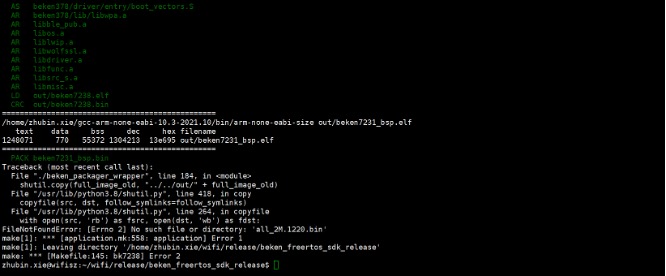
Figure 2 Compilation error icon
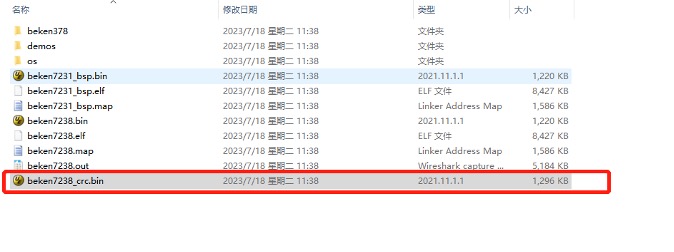
Figure 3 Compiled output firmware
There are two solutions:
- Solution 1: Check beken7238_crc.bin. The APP partition that exceeds the size is very small. You can turn off some unnecessary functions and reduce the code size. If the code size exceeds a large size, you can only implement Solution 2.
- Option 2: If the exceeded code size is large, you need to modify the partition table again.
The steps to create a partition table are as follows:
- 1. App partition table production: If the total physical length of flash is 2M, the partition_start_addr (physical address) and partition_length (physical length) of each partition need to be set in beken378/func/user_driver/BkDriverFlash.c;
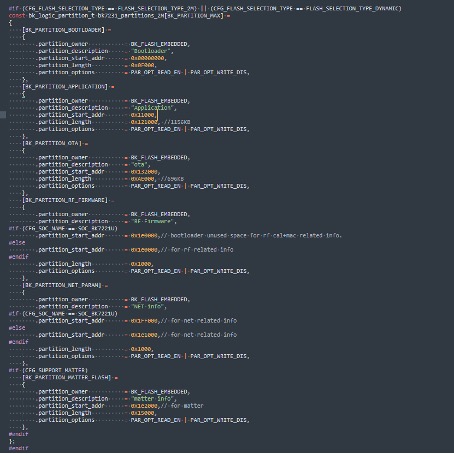
Figure 4 Illustration of partition table
- 2. Packaging script configuration: Just modify the start_addr and size in tools/beken_packager/beken_packager_wrapper according to the size of each partition in the partition table in Figure 4, (where start_addr = partition_start_addr, size = partition_length;
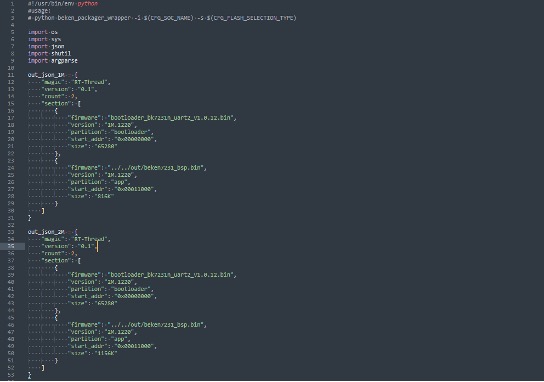
Figure 5 Packaging script configuration diagram
- 3. Use the tools/rt_partition_tool/rt_partition_tool.exe tool to modify the partition table into which the new bootloader is inserted. See Figure 6. The brief steps are as follows:
- Open the rt_partition_tool.exe tool
- Load tools/beken_packager/bootloader_bk7238_uart1_v1.0.14.bin
- Modify the corresponding partition table. Note that offset and length here are both logical addresses, that is, without CRC.
- File/save partition table to bootloader
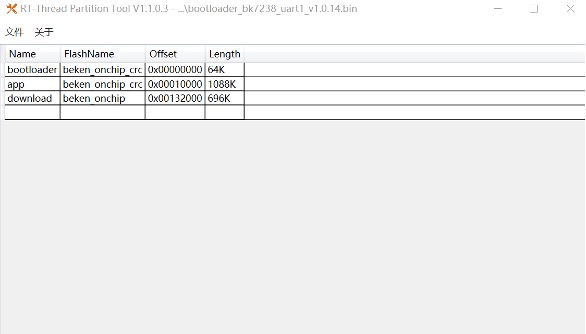
Figure 6 rt_partition_tool icon
Introduction to partition functions
The functions of each partition are introduced as shown in the table
| partition name | start address | length | functional description |
|---|---|---|---|
| bootloader | 0x00000000 | 0xf000 | Store bootloader |
| app | 0x11000 | 0x121000 | Store application image |
| OTA | 0x132000 | 0xAE000 | store updating image |
| RF_Firmware | 0x1E1000 | 0x1000 | Store calibration parameters |
| NEI_info | 0x1E2000 | 0x1000 | Store wifi mac address and fast connection parameter |
Now you can purchase BK7238 modules from here